Web Security 4 min read
Authentication vs Authorization: The Key Difference
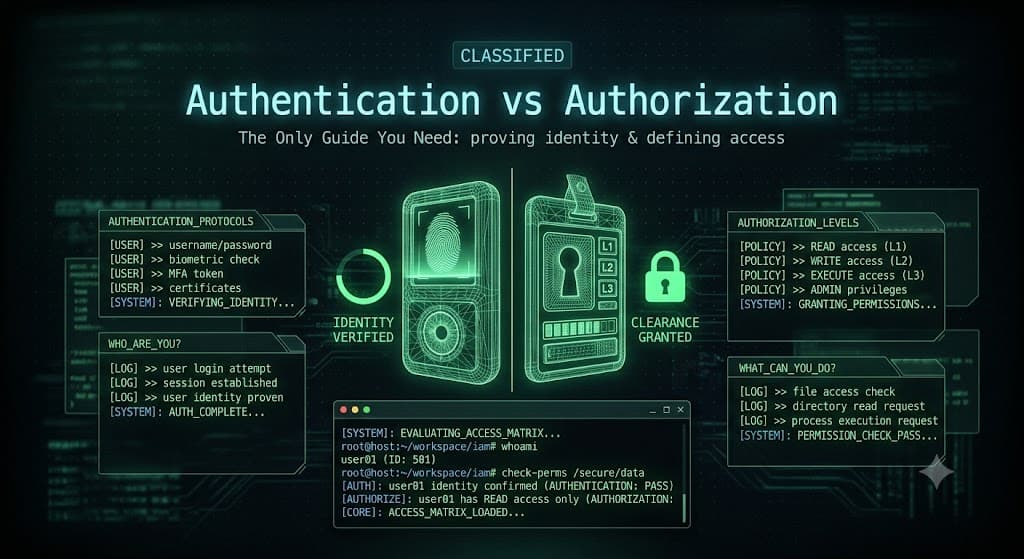
Authentication vs Authorization: The Key Difference
Authentication and authorization sound similar and are constantly confused, even by developers. But they are two different things, and mixing them up leads to serious security holes. If you work in web security, application development, or ethical hacking, you need to understand both clearly.
Here is the short version. Authentication answers "who are you?" Authorization answers "what are you allowed to do?" This guide explains both in plain English, shows how they work, and covers the common flaws attackers exploit when either one is done wrong.
The Simple Difference, With an Analogy
Imagine walking into a hotel. At the front desk, you show your ID to prove you are really the person who booked the room. That is authentication. The staff confirms your identity.
Then they give you a key card that only opens your room and the gym, but not other guests' rooms or the staff-only areas. That is authorization. Your identity is known, and now the system decides what you can access.
Authentication always comes first. You cannot decide what someone is allowed to do until you know who they are. Both must work together to keep a system secure.
| Authentication | Authorization | |
|---|---|---|
| Question it answers | Who are you? | What can you do? |
| Comes first? | Yes | After authentication |
| Based on | Passwords, tokens, biometrics | Roles, permissions, policies |
| Visible to user? | Yes, you log in | Usually hidden in the background |
| Example | Logging in with a password | Being allowed to edit vs only view |
How Authentication Works
Authentication is the process of proving you are who you claim to be. Systems verify identity using one or more "factors."
- Something you know: a password or PIN
- Something you have: a phone, security key, or token
- Something you are: a fingerprint or face scan Using two or more of these together is called multi-factor authentication (MFA), and it is one of the strongest security upgrades any system can add. Even if an attacker steals your password, they still cannot log in without your second factor.
In modern web applications, authentication often uses tokens. After you log in, the server gives your browser a token (like a JWT, or JSON Web Token) or a session cookie. Your browser sends it with every request to prove you are still logged in, so you do not have to type your password on every page.
How Authorization Works
Once the system knows who you are, authorization decides what you are permitted to access. This is also called access control. There are a few common models.
- Role-Based Access Control (RBAC): Permissions are tied to roles, like "admin," "editor," or "viewer." This is the most common model.
- Attribute-Based Access Control (ABAC): Access depends on attributes, like department, location, or time of day.
- Access Control Lists (ACLs): Each resource has a list of exactly who can access it. For example, on a blog platform, a writer can create and edit their own posts, an editor can edit anyone's posts, and an admin can also delete posts and manage users. Same login system, different permissions. That is authorization at work.
When Authentication and Authorization Break
This is where it gets interesting for security. Both authentication and authorization have their own famous vulnerabilities, and both appear on the OWASP Top 10.
Broken authentication happens when the login system is weak. Common causes include allowing weak passwords, not locking accounts after many failed attempts, exposing session tokens, or failing to use MFA. Attackers exploit these with credential stuffing and brute-force attacks.
Broken access control happens when authorization is done poorly. The most common example is IDOR (Insecure Direct Object Reference), where a user changes a value in a URL to access someone else's data. For example, if you are logged in and change the URL from /account/1001 to /account/1002 and suddenly see another person's account, that is broken access control. The system authenticated you correctly but failed to check whether you were authorized to view that specific record.
Broken access control has become one of the most common and damaging web vulnerabilities, which is why understanding the difference between these two concepts is not just academic. It is a real defensive skill.
Final Thoughts
Authentication and authorization are two locks on the same door, and you need both. Authentication proves identity. Authorization controls access. Get the order right, secure each one properly, and you close off two of the biggest categories of web attacks.
The simple takeaway: authentication is about who you are, authorization is about what you can do. Keep that straight, always check permissions on every sensitive action, and never assume that a logged-in user is automatically allowed to do everything.
Share
Comments (0)
No comments yet. Be the first to share your thoughts.