Web Security 5 min read
HTTP vs HTTPS: What's the Difference and Why It Matters
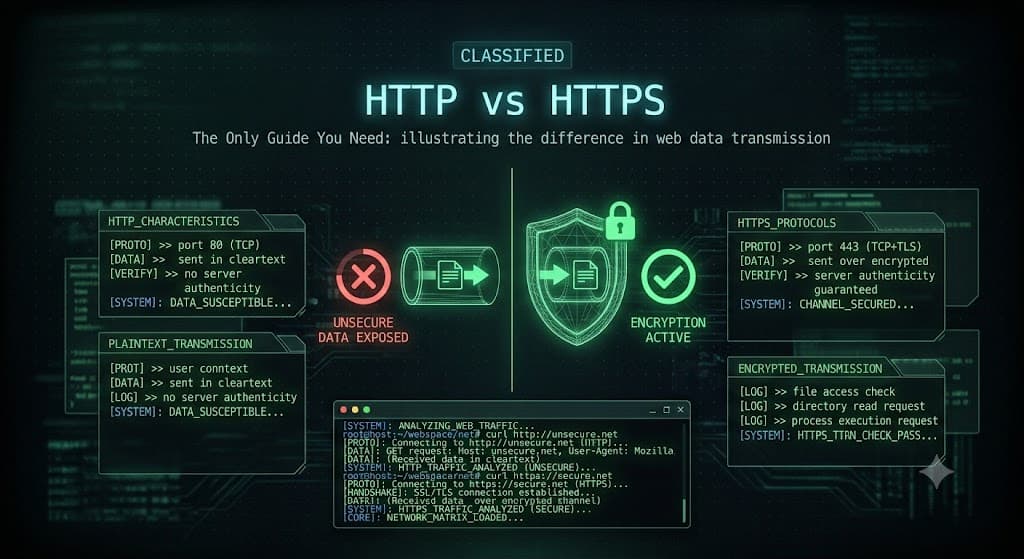
HTTP vs HTTPS: What's the Difference and Why It Matters
You see them at the start of every web address: http:// or https://. They look almost identical, just one extra letter. But that single "s" makes an enormous difference to your security and privacy. This short guide explains HTTP vs HTTPS in plain English, so you know exactly what that "s" is doing.
What Is HTTP
HTTP stands for HyperText Transfer Protocol. It is the basic system that lets your browser talk to websites and load pages. When you visit a site, your browser sends an HTTP request, and the server sends back the page.
The problem with plain HTTP is that everything travels in clear text. That means the data sent between you and the website, including passwords, messages, and credit card numbers, is not protected. Anyone positioned between you and the site, like a hacker on the same public Wi-Fi, can read it. It is like mailing a postcard that anyone handling it can read along the way.
What Is HTTPS
HTTPS stands for HyperText Transfer Protocol Secure. It is the exact same protocol as HTTP, but with a critical layer of encryption added on top, using a technology called SSL/TLS.
With HTTPS, the data between your browser and the website is scrambled so that only the two of them can read it. If a hacker intercepts it, they see meaningless gibberish. Going back to the mail example, HTTPS is like sending your message in a sealed, locked box instead of on an open postcard.
This is why your browser shows a padlock icon next to secure sites. That padlock means the connection is encrypted with HTTPS.
HTTP vs HTTPS: Side by Side
| Feature | HTTP | HTTPS |
|---|---|---|
| Full name | HyperText Transfer Protocol | HyperText Transfer Protocol Secure |
| Encryption | None, data is in clear text | Encrypted with SSL/TLS |
| Default port | 80 | 443 |
| Security | Vulnerable to eavesdropping | Protected from interception |
| Browser signal | "Not secure" warning | Padlock icon |
| Good for SEO | No, search engines rank it lower | Yes, search engines prefer it |
How HTTPS Encryption Works (The Simple Version)
When you connect to an HTTPS website, your browser and the server perform a quick "handshake" before sharing any real data. In simple terms:
- The website presents an SSL/TLS certificate to prove it is genuine.
- Your browser checks that the certificate is valid and trusted.
- The two sides agree on a secret key that only they know.
- From then on, all data is encrypted using that key. All of this happens in a fraction of a second, every time, without you noticing. The result is a private, tamper-proof connection.
Why HTTPS Matters Today
HTTPS is no longer optional. Here is why every website needs it.
- Security: It protects sensitive data like logins and payments from being stolen.
- Trust: Visitors see the padlock and feel safe. Browsers now openly warn users away from plain HTTP sites with a "Not Secure" label.
- SEO: Search engines give a ranking boost to HTTPS websites, so it helps you rank higher.
- Modern features: Many modern web features simply refuse to work over insecure HTTP. Getting HTTPS is also easy and often free, thanks to services like Let's Encrypt that provide certificates at no cost.
Final Thoughts
The difference between HTTP and HTTPS comes down to one word: encryption. HTTP sends your data in the open. HTTPS locks it up so only you and the website can read it. For security, user trust, and even search rankings, HTTPS is the clear standard, and there is no good reason to run a modern website without it.
Next time you type a password or enter a card number online, glance for that padlock. If it is not there, your data is not protected.
Share
Comments (0)
No comments yet. Be the first to share your thoughts.