Web Security 8 min read
SQL Injection Explained: Attacks, Types, and Prevention
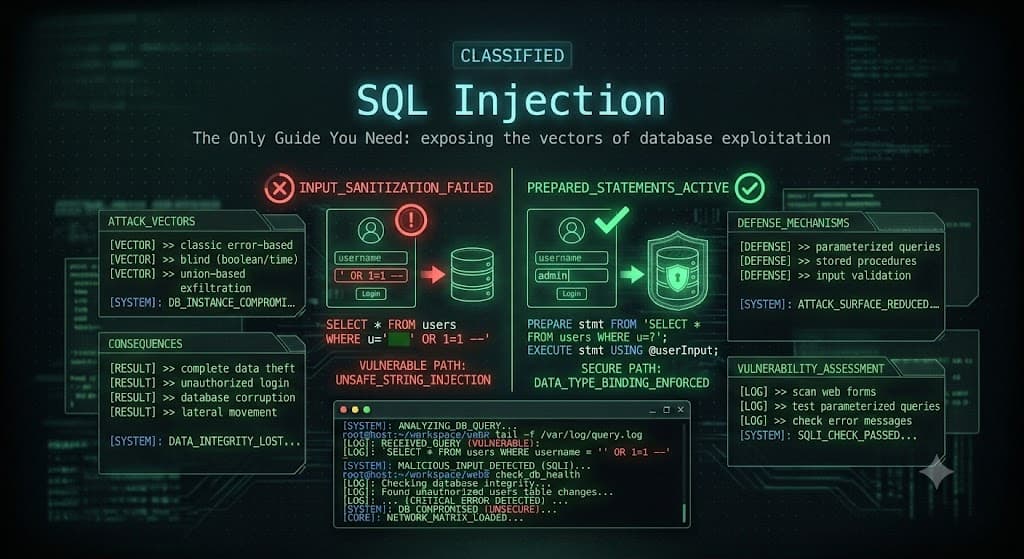
SQL Injection Explained: Attacks, Types, and Prevention
SQL injection is one of the oldest, most dangerous, and most common web vulnerabilities in the world. It has been on the OWASP Top 10 list for over twenty years, and it still shows up in real applications every single day. A single successful SQL injection attack can leak an entire database, bypass logins, steal passwords, or even hand an attacker full control of a server.
The good news is that SQL injection is very well understood, and once you see how it works, you can both spot it and stop it. This guide walks you through exactly what SQL injection is, how attackers use it, the different types, and how developers shut it down for good. We will keep the language simple and use real examples.
As always, only test these techniques on applications you own or are authorized to assess.
What Is SQL Injection, In Plain English
Most websites store their data, like usernames, passwords, and orders, in a database. To talk to that database, the application writes commands in a language called SQL (Structured Query Language). For example, when you log in, the app might ask the database, "give me the user whose name is john and whose password is secret123."
SQL injection happens when an attacker sneaks their own SQL commands into that request. If the application is not careful about how it builds its database queries, the attacker's input gets treated as a command instead of as plain data. In other words, the attacker tricks the application into running database instructions it was never supposed to run.
That is the entire heart of the vulnerability: user input being mixed directly into a database command.
How a SQL Injection Attack Actually Works
Let us look at real, vulnerable code so the mechanics click. Here is a common login query written in an unsafe way. Notice how the username and password are pasted straight into the SQL string.
php
// VULNERABLE CODE - do not use this
$username = $_POST['username'];
$password = $_POST['password'];

$query = "SELECT * FROM users WHERE username = '$username' AND password = '$password'";
$result = mysqli_query($conn, $query);
Normally a user types john and secret123, and the query works fine. But what if an attacker types this into the username box?
sql
' OR '1'='1
Now the query the database receives becomes:
sql
SELECT * FROM users WHERE username = '' OR '1'='1' AND password = ''
The piece '1'='1' is always true. The database returns a user record even though the attacker never knew a real password. This is the classic authentication bypass, and it is often the very first SQL injection anyone learns. From here, attackers can go much further, pulling out entire tables of data.
The Main Types of SQL Injection
Not all SQL injection looks the same. Attackers choose a technique based on what the application shows them back. Here are the main categories every tester should know.
| Type | How It Works | When It Is Used |
|---|---|---|
| In-band (Classic) | Attacker sends the attack and sees the result in the same response | When the app shows data or errors directly |
| Error-based | Forces the database to throw errors that leak information | When error messages are visible |
| Union-based | Uses the SQL UNION keyword to pull data from other tables | When results are displayed on the page |
| Blind (Boolean) | Asks true/false questions and watches how the page changes | When no data or errors are shown |
| Blind (Time-based) | Tells the database to pause, and measures the delay | When the page looks identical no matter what |
| Out-of-band | Makes the database send data to the attacker's server | When other methods fail or are too slow |
Union-Based Injection Example
Union-based injection is powerful because it lets an attacker read data from completely different tables. Suppose a product page uses this query:
sql
SELECT name, price FROM products WHERE id = 1
An attacker might inject a value that turns it into:
sql
SELECT name, price FROM products WHERE id = 1 UNION SELECT username, password FROM users
Now the page that was supposed to show product names and prices also displays usernames and passwords. That is the danger of union-based SQL injection.
Blind SQL Injection Example
Sometimes the application shows nothing useful, no data and no errors. Attackers then use blind injection, asking the database yes-or-no questions. A time-based version tells the database to wait if a condition is true:
sql
' OR IF(1=1, SLEEP(5), 0)-- -
If the page takes five seconds longer to load, the attacker knows the condition was true. By repeating this thousands of times, automated tools can slowly extract an entire database one character at a time. It is slow, but it works, which is why blind SQLi is so serious.
The Real Business Impact of SQL Injection
SQL injection is not a theoretical problem. A successful attack can cause:
- Data breaches, exposing millions of customer records, emails, and passwords
- Authentication bypass, letting attackers log in as any user, including admins
- Data destruction, if attackers delete or modify records
- Full server takeover, in the worst cases, using advanced techniques to run system commands
- Legal and financial damage, including fines under laws like GDPR and lost customer trust Many of the largest data breaches in history started with a simple SQL injection flaw. That is why it stays near the top of every security priority list.
How to Detect SQL Injection
Testers look for SQL injection in any place where user input reaches the database: login forms, search boxes, URL parameters, and hidden fields. A quick manual test is to enter a single quote ' into a field and watch for a database error. Errors are a strong hint that input is not being handled safely.
For deeper testing, security professionals use sqlmap, a free and powerful tool that automates SQL injection discovery and exploitation:
bash
# Test a URL parameter for SQL injection with sqlmap
sqlmap -u "https://example.com/product?id=1" --batch

# If vulnerable, list the databases
sqlmap -u "https://example.com/product?id=1" --dbs
Remember, only run tools like sqlmap against systems you are authorized to test.
How to Prevent SQL Injection: The Real Fixes
Here is the most important part. SQL injection is completely preventable. These are the defenses that actually work, in order of importance.
1. Use Prepared Statements (Parameterized Queries)
This is the number one fix, and it stops almost all SQL injection. Prepared statements keep the SQL command and the user data separate, so input can never be treated as a command. Here is the safe version of our earlier login code.
php
// SAFE CODE using prepared statements
$stmt = $conn->prepare("SELECT * FROM users WHERE username = ? AND password = ?");
$stmt->bind_param("ss", $username, $password);
$stmt->execute();
$result = $stmt->get_result();
The same idea works in every language. Here it is in Python:
python
# SAFE CODE in Python
cursor.execute(
    "SELECT * FROM users WHERE username = %s AND password = %s",
    (username, password)
)
The ? and %s placeholders are the key. The database knows those spots are data, never commands.
2. Use an ORM or Query Builder
Modern frameworks use tools called ORMs (Object Relational Mappers) that build safe queries for you automatically. Examples include Hibernate for Java, Django ORM for Python, and Eloquent for PHP. Used correctly, they use prepared statements under the hood.
3. Validate and Sanitize Input
Never trust user input. Check that data matches what you expect. If a field should be a number, reject anything that is not a number. This is a helpful second layer, but it should never be your only defense.
4. Apply Least Privilege to the Database
The account your application uses to talk to the database should have only the permissions it truly needs. If the app only reads data, it should not have permission to delete tables. This way, even if an attack succeeds, the damage is limited.
5. Use a Web Application Firewall
A Web Application Firewall (WAF) can catch and block many common SQL injection attempts before they reach your application. Think of it as a safety net, not a replacement for secure code.
SQL Injection Prevention Checklist
Use this quick checklist to lock down any application.
| Defense | Status Goal |
|---|---|
| Prepared statements everywhere | Every database query uses parameters, not string joining |
| No raw string concatenation | User input is never pasted directly into SQL |
| Input validation | Fields check type, length, and format |
| Least privilege database user | App account cannot drop tables or access unrelated data |
| Error messages hidden | Database errors are not shown to users |
| WAF enabled | Common attack patterns are filtered at the edge |
| Regular testing | Code is scanned and tested for SQLi before release |
Final Thoughts
SQL injection has survived for decades not because it is hard to fix, but because developers keep building queries the unsafe way. Now you know better. The mechanics are simple: user input sneaks into a database command. The fix is even simpler: keep commands and data separate with prepared statements.
If you are learning security, practice SQL injection legally on training apps like DVWA, bWAPP, or PortSwigger's free Web Security Academy. If you are a developer, audit your code for string-built queries today and switch them to parameterized ones. That one habit alone will protect you from the most common serious vulnerability on the web.
Reminder: Test only on applications you own or have explicit permission to assess.
Share
Comments (0)
No comments yet. Be the first to share your thoughts.